How to Add and Edit Cookie Banner in Squarespace [2026 Guide]
Want to create a custom cookie banner that perfectly matches with your Squarespace website’s style?
In the guide below, I’ll walk you through the entire process of customizing your Squarespace cookies alert, everything from using the built-in design options to applying custom CSS for more advanced styling.
If you’ve used CSS to edit your cookie banner for your Squarespace website in recent years - chances are you’re going to need to update the code now, as Squarespace have released a new update to cookie banners in Squarespace 7.1.
Step 1: Opening the Squarespace settings menu.
To get started, log in to your Squarespace account and open your site. On the left menu, click the “Settings” icon at the bottom.

Next, in the “Website” tab, locate and click on the “Cookies and Data Privacy” option.

Step 2: Enable the cookie banner.
Inside of the “Cookies and Data Privacy” section, switch on the “Cookie banner” option.
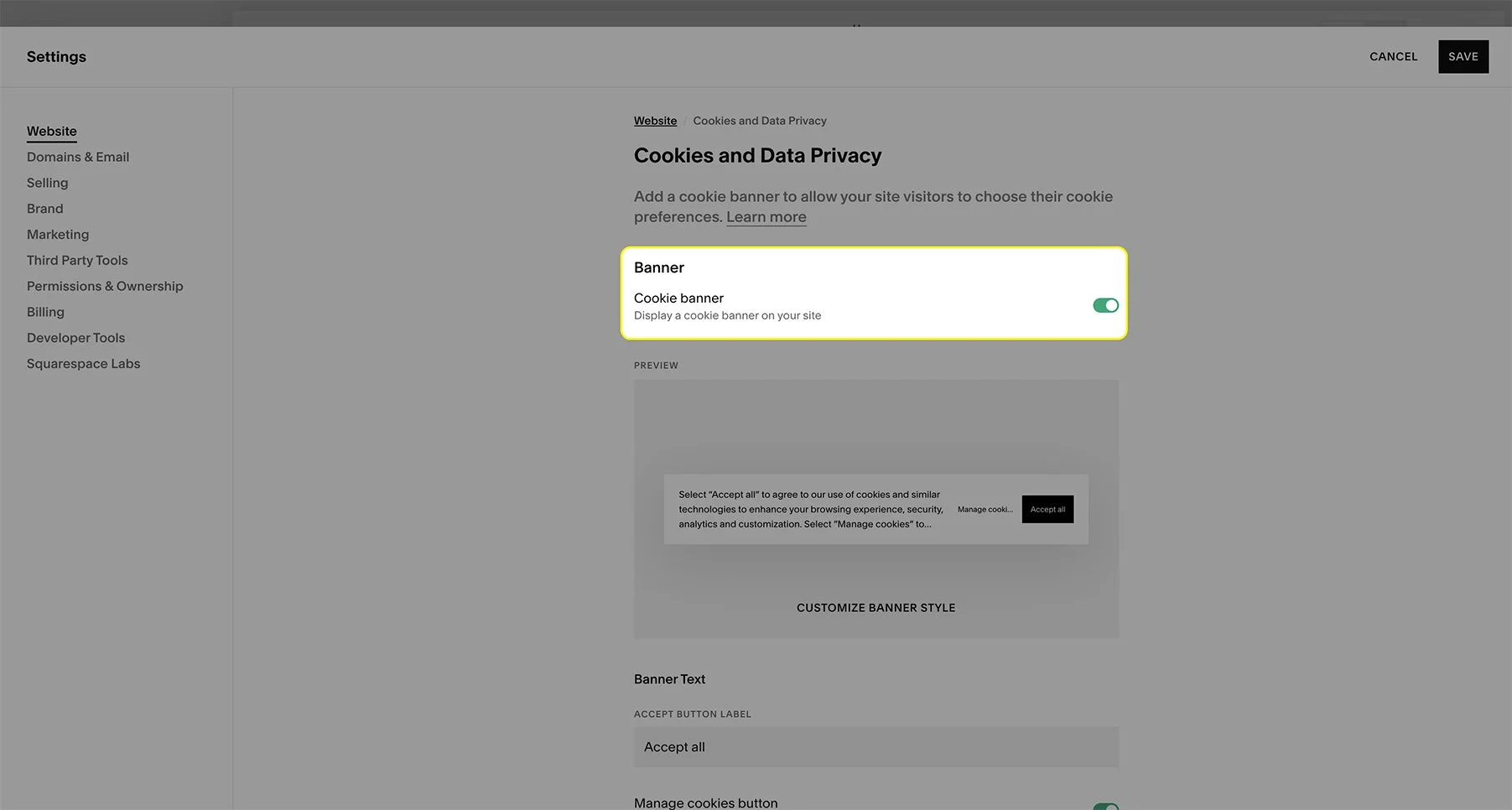
Step 3: Customizing the cookie banner.
Once your banner is enabled, you will now see the “Customize banner style” option appear. Click this to edit the banner’s appearance.

Here you can see how your cookie banner looks and the different customization options. You can choose the color theme that matches your site’s style best, in our case “Lightest 1”, and my personal favorite banner position for most site’s is “Bottom Left”. You can also tweak the disclaimer text size too if you’d like it to be bigger or smaller - just make sure it’s easy to read. Feel free to experiment with the different styles to see what works best for your website!

STEP 4: Edit with custom CSS (optional).
You can further customize your cookie banner by using some custom CSS code. In the below example, i’ve used CSS code to round the corner radius of the banner by 10px. This is a modification I use on my own Squarespace website here!
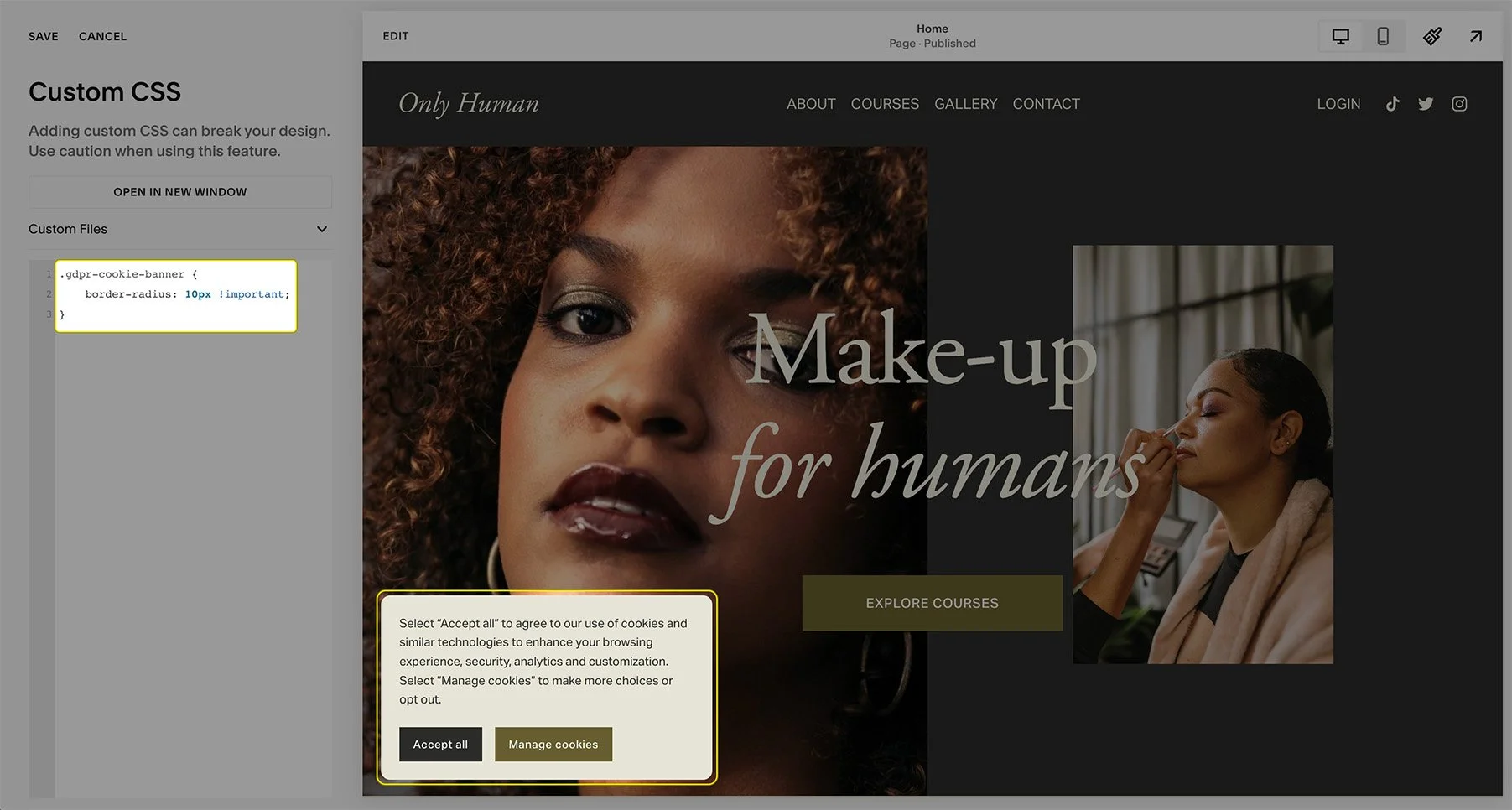
Below are some of the custom CSS tweaks you can make to your cookies banner. These include: background color and border styling.
.gdpr-cookie-banner {
background: #efefef !important;
border: 2px solid #0000ff !important;
border-radius: 10px !important;
}
STEP 5: SAVE AND PREVIEW YOUR CHANGES!
That’s it! Your cookie banner is now set. Remember to save your changes by clicking “Save” in the top right of the menu.
If you now see the cookie banner on your website when you open in a new browser, congratulations! You have successfully updated the cookie banner on Squarespace 7.1.
5 benefits of Incorporating a Cookie Banner into Your Squarespace Website:
Here are five benefits of incorporating cookie banners into your Squarespace website:
1. Legal Compliance
Cookie banners help ensure your website complies with various data protection regulations, such as the GDPR (General Data Protection Regulation) and CCPA (California Consumer Privacy Act). By informing users about cookie usage and obtaining their consent, you avoid potential legal penalties.
2. Transparency and Trust
Displaying a cookie banner shows that your website is transparent about data collection practices. This transparency helps build trust with your visitors, making them feel more secure and confident while browsing your Squarespace site.
3. Improved User Experience
By giving users control over their cookie preferences, you can enhance their browsing experience. Users appreciate having the option to customize their privacy settings, leading to a more positive interaction with your Squarespace site.
4. Data Management
Cookie banners allow you to manage user data more effectively. By obtaining explicit consent, you can better segment your audience and tailor your marketing strategies based on user preferences and behavior.
5. Enhanced Design Integration
Customizable cookie banners can be designed to match your website’s aesthetics, ensuring a seamless and professional look. This integration not only makes the banner less intrusive but also maintains the overall design integrity of your Squarespace site.
Your users will thank you for adding this.
Congrats! You’ve officially reached the bottom of the article.
Want more tips like this? Join my newsletter below! It’s free, and I won’t spam you.
Your Squarespace Designer
Hi, I’m Nick. I've been designing killer brands and stunning websites for over five years. I have worked with all types of clients of all sizes, from entrepreneurs to global corporations, and I combine my graphic design & branding experience with Squarespace specialism to make bespoke websites that are uniquely you.
Ready to discuss your project? Book a free 15 min consultation call!