Squarespace Booking System (2026): Acuity vs Calendly vs Cal.com, and How I Set Them Up

By Nick Croce
The question I get most from clinics, coaches, trainers and studios is some version of "can people book me through my Squarespace site?" Yes. But the honest first answer is that Squarespace doesn't include a booking system in any of its website plans, which surprises people who've seen "scheduling" all over its marketing.
What Squarespace sells is Acuity Scheduling, a separate product it owns, with its own subscription and its own trial. Alongside it there are two tools I use a lot that aren't Squarespace's at all: Calendly and Cal.com. I've set up all three on client sites, from a telehealth company booking doctors across US states to a pottery studio filling classes, and my own contact page runs on one of them. Here's how they compare, what they cost in the UK, and how I put them on a site.
Prices below are from each company's own pricing page on 16 October 2026. They move, so check before you buy.
The short answer
If you're one person taking free discovery calls, use Cal.com's free plan or Calendly's free plan and embed it. You'll pay nothing and it'll work.
If you're a service business that takes paid appointments, has more than one person or room to book, or loses money to no-shows, use Acuity on the Standard plan at £20 a month. That's the one with text reminders, packages and memberships, and it's what I put on most clinic and studio sites.
If you're a team doing sales calls and want round-robin booking, that's Calendly Teams or Cal.com Teams, not Acuity.
Everything below is the reasoning.
Does Squarespace have a built-in booking system?
No. The four website plans, Basic through Advanced, cover the site, the shop, digital products and memberships. Appointment booking isn't on the list. If you want visitors to pick a time and book, you need a scheduling tool on top, and you pay for it separately. (The site plans themselves are covered in my Squarespace cost guide.)
The confusing part is the branding. Squarespace bought Acuity Scheduling years ago, called it "Squarespace Scheduling" for a while, then went back to the Acuity name. Squarespace's own FAQ has a question on exactly that, because everyone asks. So when a Squarespace article mentions the Scheduling block in the editor, that block is just the container that Acuity sits in. You can also use Acuity with no Squarespace site at all; their page says so in the first line.
Acuity Scheduling: UK prices and what each plan gets you
Acuity has three plans. The prices are in pounds on Squarespace's UK scheduling page, and you save a little by paying for the year.
| Plan | Paid annually | Paid monthly | Bookable calendars |
|---|---|---|---|
| Starter | £11 a month | £12 a month | 1 |
| Standard | £20 a month | £22 a month | Up to 6 |
| Premium | £37 a month | £40 a month | Up to 36 |
- Starter gets you client self-scheduling, unlimited services and appointments, payments and deposits through Stripe, Square or PayPal, and confirmation, reminder and follow-up emails.
- Standard adds text message reminders, bundled appointment packages, memberships and subscriptions with automated billing, and gift certificates.
- Premium adds removal of the "Powered by Acuity" line, a signed BAA for HIPAA, multiple time zones for staff in different places, and custom API and CSS access.
Every plan includes the things you'd expect to pay extra for: embedding the scheduler in your website, your brand colours and logo, the mobile app, Zoom and Google Meet links on virtual appointments, custom intake forms, payment links after an appointment, classes and group events, and automatic time zone conversion for the client. The trial needs no card and no website.
A "calendar" is one bookable thing: a practitioner, a treatment room, a studio. One osteopath is one calendar. A clinic with four practitioners is four calendars, which puts it on Standard whatever else it needs.
The feature that decides the plan for most of my clients isn't the calendar count, it's text reminders. They're only on Standard and above, and for anyone whose problem is people not turning up, the extra £9 a month pays for itself the first time it saves a slot.
Calendly and Cal.com: the two alternatives I actually use
Both of these are booking pages first and embeds second. They're built around "pick a time with me", not around running a business with staff, packages and a front desk. That makes them simpler, and for a lot of people simpler is right.
Calendly has a free plan with one event type and one calendar connection, which is enough for "book a 20-minute call". The Standard plan is $10 a seat a month on annual billing and adds payments through Stripe or PayPal and automated reminders. It's priced in dollars wherever you are.
Cal.com is the one I use myself. The individual plan is free, for good, and includes unlimited event types, email and SMS notifications, and Stripe and PayPal payments. Teams is $12 a user a month and adds shared availability, round robin and recurring events. It's open source, which matters to me less than the fact that the free plan does the whole job for a one-person business.
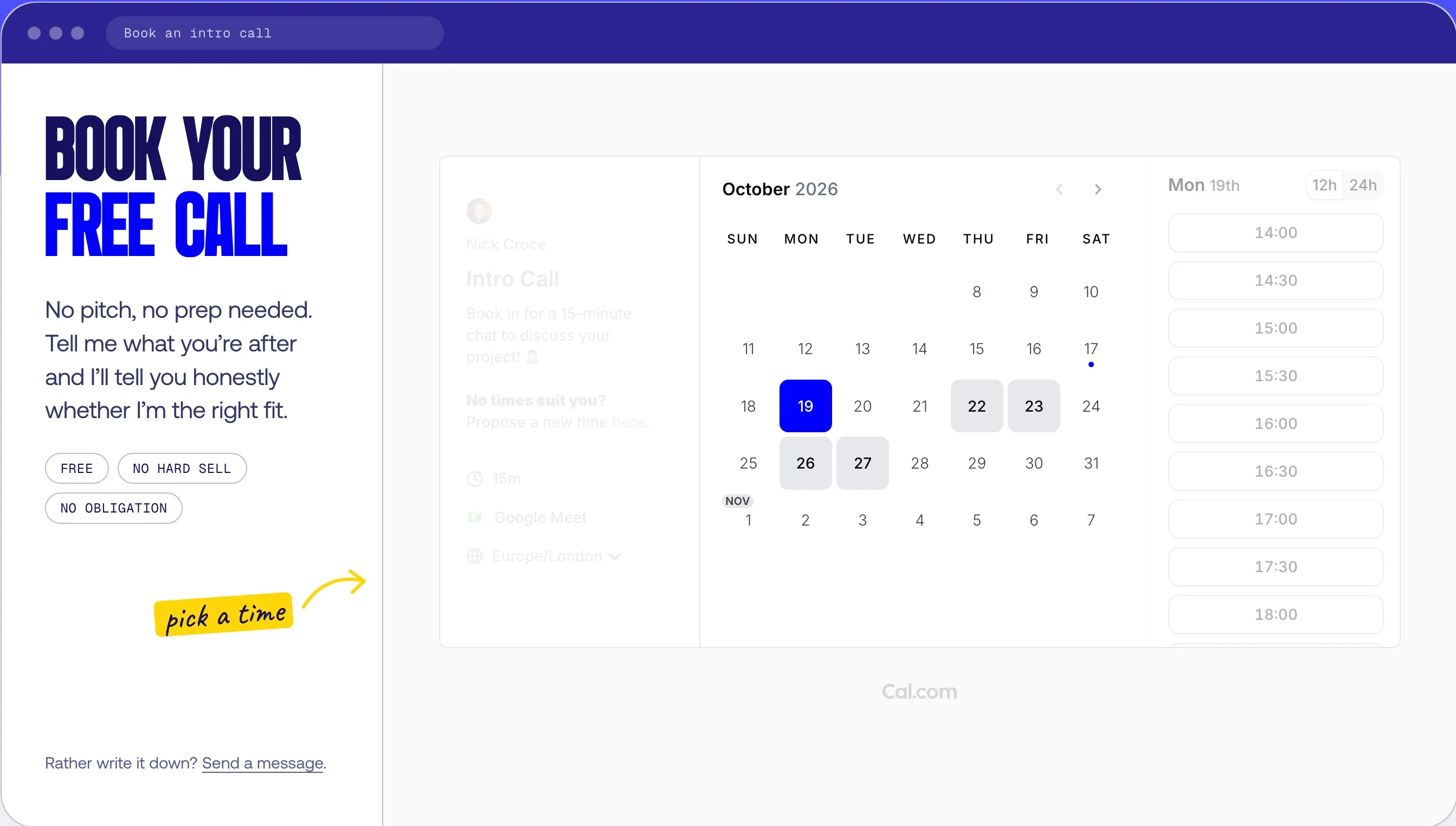
My own contact page has a Cal.com scheduler embedded under the heading, in the site's own colours, with the form further down for people who'd rather write.
Where they fall down is exactly where Acuity gets going: packages of six sessions, a membership that bills monthly, a class with twenty places, a receptionist who needs to see four diaries at once, gift vouchers. If any of that is your business, skip the free tools and go straight to Acuity.
Which one should you pick?
| Your situation | What I'd use | Roughly what it costs |
|---|---|---|
| One person, free calls or consultations | Cal.com free, or Calendly free | £0 |
| One person, paid sessions, no-shows are a problem | Acuity Standard (for the text reminders) | £20 a month |
| Clinic, salon or studio with several practitioners | Acuity Standard | £20 a month, up to 6 calendars |
| Classes, workshops or group sessions | Acuity, any plan | From £11 a month |
| Sales team, round-robin or shared availability | Calendly Teams or Cal.com Teams | $16 or $12 a seat a month |
| Health data under US HIPAA rules | Acuity Premium | £37 a month |
How I add a booking system to a Squarespace site, step by step
This is the order I do it in on a client project. Most of it is decisions, not clicks.
- Decide what's bookable. Every service, how long it takes, how much gap you want after it, and how many people or rooms can be booked. Write it down before you open the software. This list decides the plan.
- Open the account. Acuity's trial needs no card. Create one appointment type per service with its length, price and padding time. Give them plain names a client would recognise, not internal codes.
- Set availability and limits. Working hours per calendar, a daily booking cap if you need one, minimum notice (nobody wants a booking for ten minutes from now) and your cancellation window.
- Build the intake form. Ask only what you need before the first session. For StayWell Health we added policy documents the patient has to acknowledge before the booking goes through, which is the kind of thing a plain contact form can't do.
- Turn on payments. Full payment, a deposit, or pay on the day. In the UK that's Stripe. If no-shows are costing you, take a deposit; it changes behaviour overnight.
- Set the reminders. Confirmation and reminder emails on every plan, text reminders on Standard and above. Edit the wording so it sounds like you.
- Put it on the site. Make a page called Book, add a Scheduling block, pick the scheduler, done. Keep the page short: one heading, one line of reassurance, the scheduler. Then put a Book button in the main navigation, because a booking system nobody can find is a diary.
- Match the colours. Acuity, Calendly and Cal.com all let you set brand colours. A blue scheduler on a green site looks like an advert.
- Test it on your phone. Book yourself, pay, cancel, rebook. Read every email that arrives. Most of your clients will do this on a phone, so that's where it has to work.
- Track it. Set up a conversion event in Google Analytics on the booking confirmation. Otherwise you'll never know whether the site is producing bookings or your Instagram is.
If you'd rather someone did all of that for you, it's part of every build I do; the booking system is set up and tested before the site goes live, not left as homework.
Three booking systems I've built
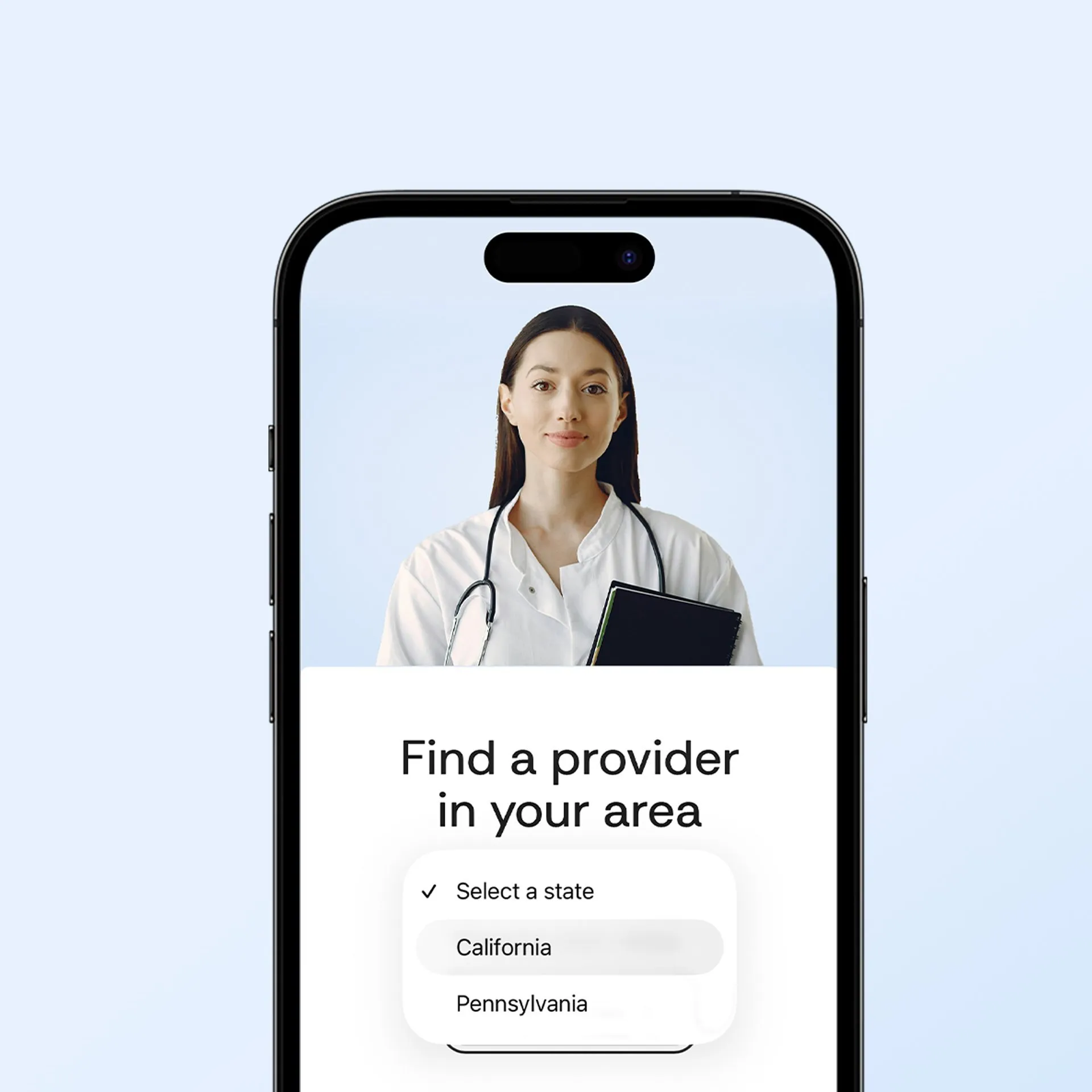
StayWell Health deliver medical care to guests staying in short-term rentals across the US, and that model comes with a rule: a doctor can only see patients in the states they’re licensed in. One shared calendar would have let a guest in Pennsylvania book a doctor who couldn’t legally treat them.
So the booking page starts with a question, not a calendar. The patient picks their state from a dropdown, and that choice decides which Acuity scheduler appears underneath. Each state has its own Acuity calendar with only the doctors licensed there, so the patient only ever sees appointments they can actually book. The filter is custom code on the Squarespace side; the calendars, intake forms, policy acknowledgements and the confirmation, reminder and follow-up emails are all Acuity.
It’s a good example of what the Scheduling block can’t do on its own and what a bit of code around it can: the same product, used as several calendars behind one front door. Four weeks, start to finish.
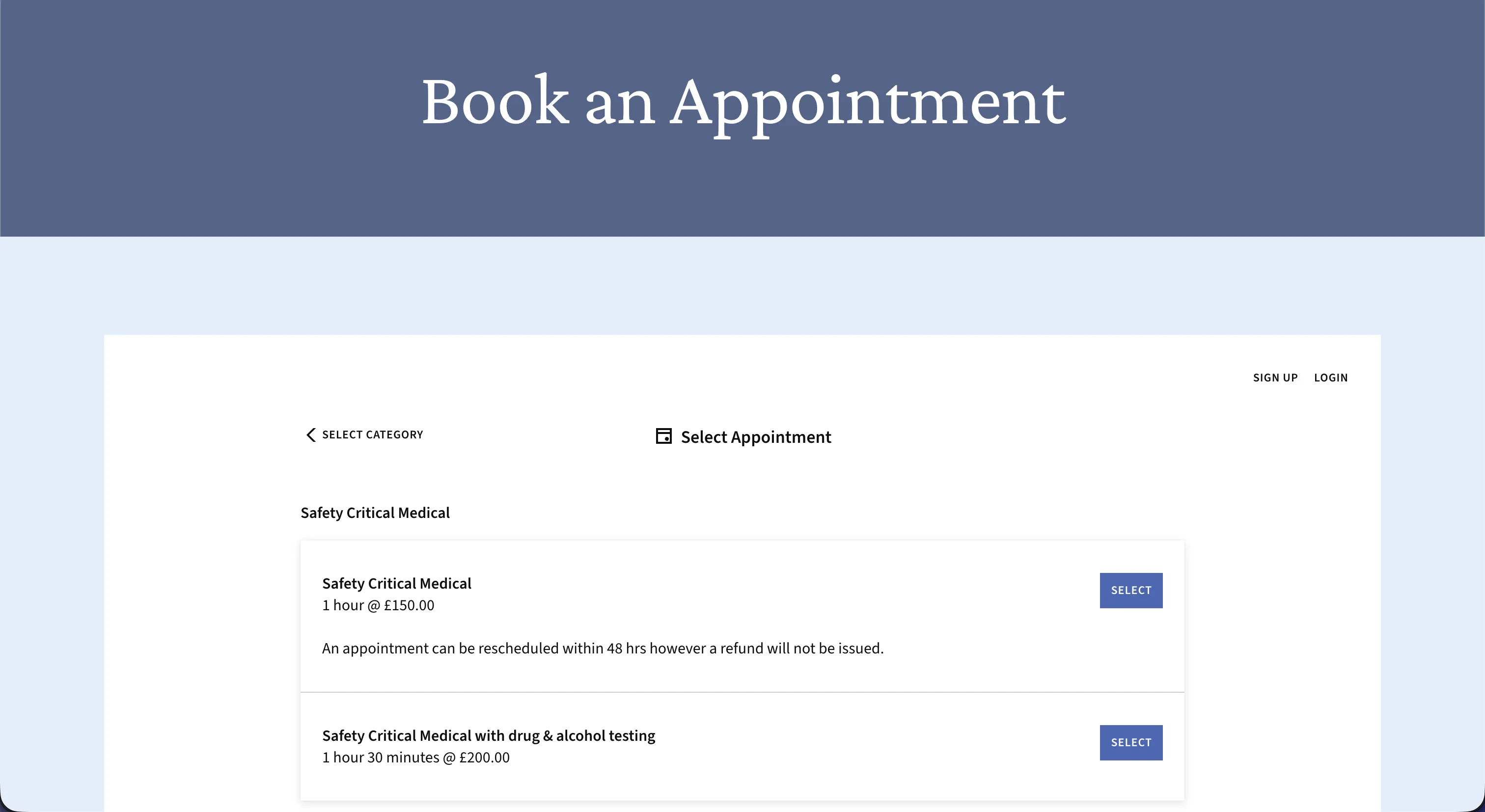
Turners Occupational Health are a family-run occupational health business in Norfolk. Their old Squarespace site was clunky for them and their users, so we rebuilt more than twenty pages and upgraded their Acuity setup so clients book appointments straight from the site instead of phoning. The booking page above is the live one: the client picks a category first, then an appointment type with its length and price shown up front, reads the 48-hour reschedule policy on the appointment itself, and pays when they book. Nothing on that page is a workaround; it’s Acuity’s own flow, embedded and styled to match.
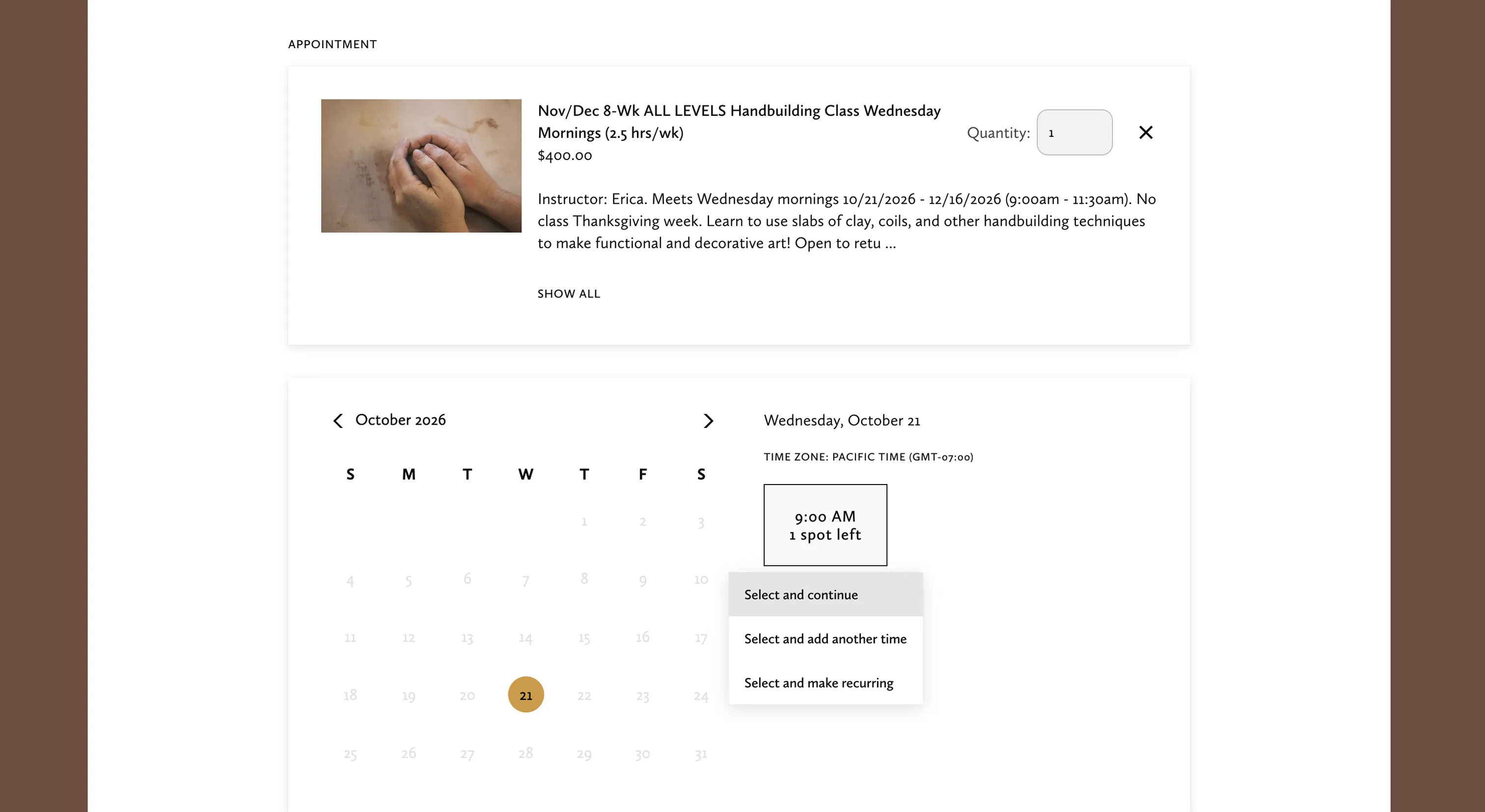
Lizzy Eichorn Studios needed a portfolio site that also filled her pottery classes at Monterey Clay Studio. The page above is the live one: an eight-week handbuilding course is a single Acuity class with its price, instructor, dates and times on the listing, a quantity box for booking more than one place, and the number of spots left shown on the time slot, so a class closes itself when it’s full. That used to be a waiting list managed by email. Arta’s Flowers in Liverpool does something similar for her workshops alongside the shop.
Mistakes I see on DIY booking pages
- The Book button opens a new tab to a booking page in the tool's default colours. Embed it, and match the brand.
- No padding time, so appointments run back to back with no room to overrun or write notes.
- No deposit on a service with a no-show problem. The deposit is the fix.
- An intake form with twelve questions before the client has even picked a time. Ask the rest after they've booked.
- The booking page is three clicks deep. It belongs in the main navigation.
- A team of three on the Starter plan, sharing one calendar, and nobody knowing whose 2pm it is.
- No tracking, so the business can't say how many bookings the website actually made.
Questions people ask
Is there a booking system built into Squarespace?
No. None of the Squarespace website plans includes appointment scheduling. Squarespace owns a separate booking product, Acuity Scheduling, which you pay for on its own and embed in the site using the Scheduling block.
Is Acuity free with Squarespace?
No. Acuity is a separate subscription from £11 a month on annual billing, whatever Squarespace plan you're on. There's a free trial with no card needed, but no free plan.
How much does Acuity Scheduling cost in the UK?
£11, £20 or £37 a month on annual billing for Starter, Standard and Premium, or £12, £22 and £40 paid monthly. Those are the figures on Squarespace's UK scheduling page on 16 October 2026.
Can clients pay when they book?
Yes, on every Acuity plan, through Stripe, Square or PayPal, including deposits. Calendly needs its Standard plan for payments; Cal.com includes Stripe and PayPal on the free plan.
Can I use Calendly or Cal.com on a Squarespace site?
Yes. Both give you an embed code that goes into an Embed block, or a Code block on the plans that allow custom code, and both have a free plan. They suit one-person businesses taking calls; Acuity suits businesses with staff, classes or packages.
What's the difference between Squarespace Scheduling and Acuity Scheduling?
Nothing. They're the same product. Squarespace used both names for a while and now calls it Acuity Scheduling.
If you're not sure which tool your business needs, book a free 15-minute call. Through Cal.com, naturally, and if the answer is "use the free one", I'll say so.